
Possibilities for submitting the declaration
- The declaration can be submitted in the e-MTA by either entering data manually or uploading as a file.
The declaration may be uploaded as an XML file, in a single file or separately by annexes. In addition, annexes 1 and 2 and the INF1 form can also be imported from a CSV file after the declaration has been formed.
submit declaration The declaration can also be submitted via X-tee.
- The form TSD can be submitted on paper only if there are up to five rows, i.e. five or less recipients to be declared.
Useful links
Handbook “Submission of declaration form TSD”
""
Pre-filling form TSD with employment register data
Starting from March 2023, companies can start filling in annex 1 and annex 2 of the form TSD with the data of persons registered in the employment register. The need for such feature emerged during usability interviews with entrepreneurs.
The purpose of the functionality is that the payer does not have to use two e-MTA applications (form TSD and employment register) at the same time. For example, when declaring payments to new employees, the payer does not have to use the employment register meanwhile searching for an employee's personal identification code.
It is now possible to start filling in annexes 1 and 2 of form TSD by using the data of the employment register:

If you start filling in annexes 1 and 2 with the data of the employment register:
- the data of all persons who had valid employment entries during the declaration period (all types of employment) is pre-filled in the annexes;
- personal ID code and name are pre-filled. Payment type and amount and basic exemption type and amount must be added by the payer.
The payer can start filling in annex 1 and/or 2 through other channels, for example, by XML file, CSV file, by selecting "Use prior annex 1 as basis" button on the TSD in the e-services environment and then click the "Add data from the employment register" button. In this case, the data of those persons, for whom payments have not been previously declared in annex 1 and/or annex 2, is transferred from the employment register to the beginning of the list in annex 1 and/or annex 2.
In the case of persons added additionally from the employment register, the personal ID code and name are pre-filled. The type and amount of payment and the type and amount of basic exemption must be added by the person making the payment.
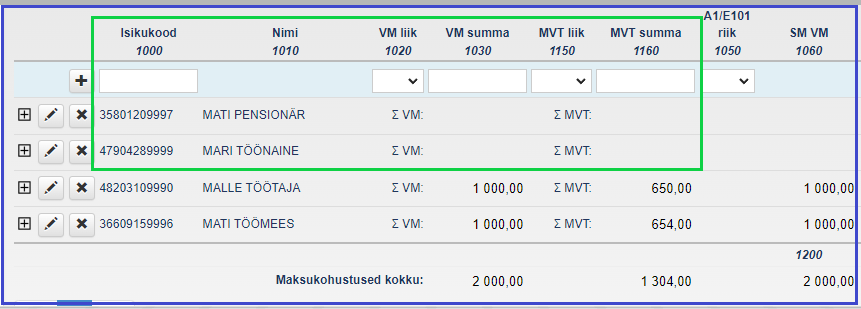
If the type and amount of the payment are not added to the persons added from the employment register, an error message will appear about the missing payment.
NB! It is not possible to confirm the form TSD without adding payments.
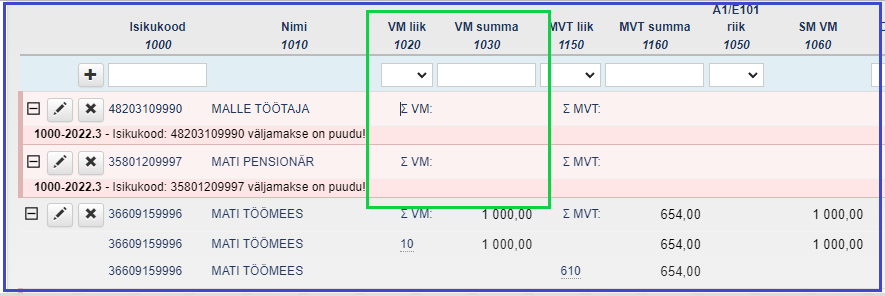
If filling in annex 1 is started with the employment register data and no payment has been made to the person, then the person added according to employment register data must be deleted from annex 1 or annex 2.
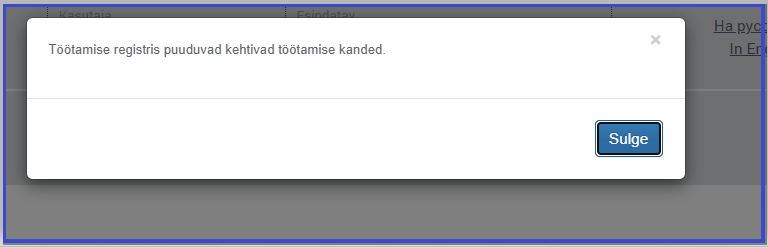
If filling in annex 1 is started with employment register data and there are no employment entries in the employment register, the corresponding message opens in a pop-up window:
Comparing the data of persons declared in annex 1 and/or annex 2 of form TSD with the data of the employment register
If there are undeclared payments in annex 1 and/or annex 2 of the form TSD to persons who have a valid employment record in the employment register for the same period, a warning message will be displayed. Additional checks are made for all types of employment and employment entries valid during the declaration period.
NB! This is a warning message that does not prevent confirmation of the form TSD.
The purpose of the additional check is to:
- draw the payer's attention to whether the payments to all persons for whom employment entries have been made in the employment register have also been declared on the form TSD;
- terminate expired employment entries in the employment register.
If there is an entry of employment for a person in the employment register, but no payment is declared to the person in annex 1 and/or annex 2 of the TSD, a warning with names is displayed when submitting the TSD (personal ID code and surname):
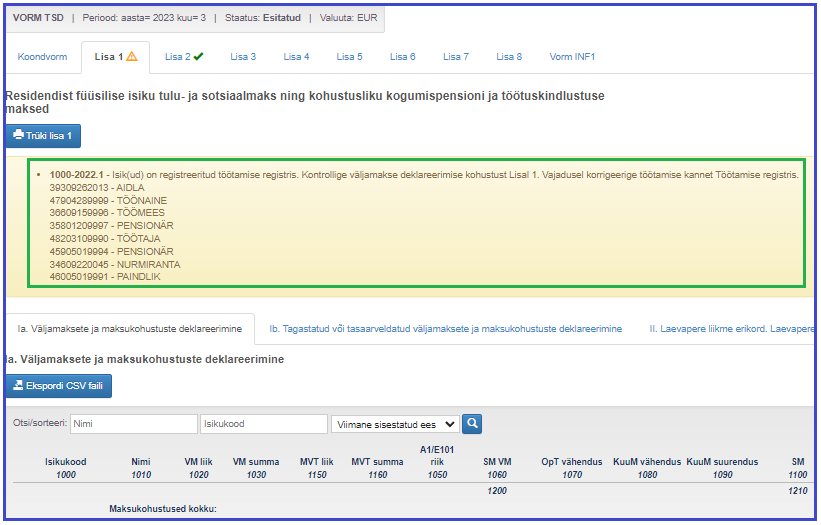
If there are undeclared payments in annex 1 and/or annex 2 of the form TSD to more than 20 persons who have a valid employment record in the employment register for the same period, a numerical warning message (the number of employees, whose payments have not been declared) will be displayed when submitting the form TSD:
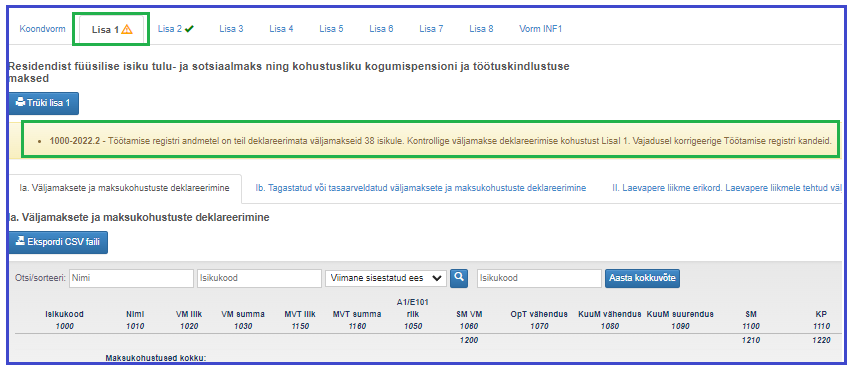
The payer can see warnings about persons whose data is not declared on the TSD, but who have valid employment entries in the employment register, both on the consolidated form and in the upper part of annex 1 and annex 2.
The meaning of the green and yellow ticks in annex 1 and annex 2 has changed
The comparison of the data of persons not declared on TSD with valid employment register entries is checked on annex 1 and annex 2. In certain cases, green or yellow ticks appear on annex 1 and annex 2 even if there is no data on the annexes.

A green tick appears:
- if payments are declared in annex 1 and/or annex 2 to all persons who have employment entries in the employment register and the data is correct, or
- if payments are not declared to persons in annex 1 and/or annex 2 and there are no valid employment entries in the employment register.
A yellow tick appears:
- if there are valid employment register entries for persons to whom payments have not been declared in annex 1 and/or annex 2, or
- if payments to all persons who have employment register entries are declared in annex 1 and/or 2, but the data is inaccurate.
NB! The yellow tick does not prevent the confirmation of form TSD.
Income and social tax return confirmation pop-up window
If there are warnings on the return, when you click the "Submit" button on the consolidated form, a pop-up window will open for the person submitting the return with the notification “TSD has warnings, do you want to submit the return?”.
If the person submitting the return selects “Submit”, the return is confirmed with warnings.
If the person wishes to read the warnings, they should select “Back”. In this case, the return will not be confirmed. The entrepreneur can review the warnings on the return and, if necessary, correct the data on the TSD or in the employment register.
If the person submitting the return is unable to make changes to the originally declared data and selects “Submit” again, a pop-up window with options appears. If the person submitting the return does not want to correct the data, they should select “Submit”, after which the return is confirmed with warnings.
Last updated on 08.01.2025
Last updated: 08.10.2026